
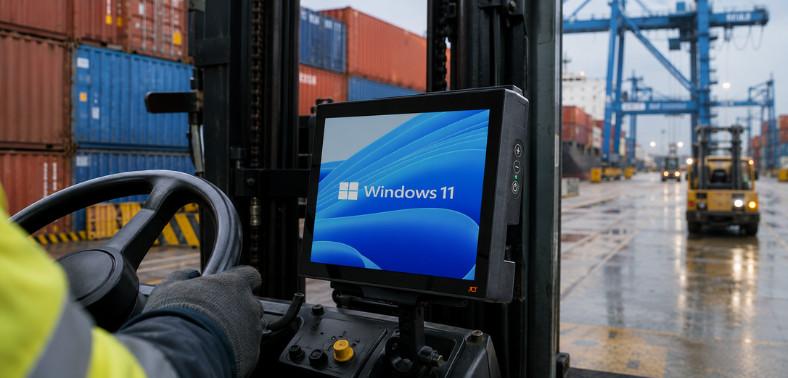
Industrial operations are entering a new phase of technology planning. As organizations move beyond aging Windows platforms, IT and operations teams must consider more than simply installing a newer operating system. The hardware, software environment, connectivity, lifecycle strategy, and working conditions all influence whether a migration will improve operations or introduce unnecessary disruption.
For warehouses, ports, manufacturing facilities, transportation operations, mining environments, and field work, computing equipment must perform reliably throughout long shifts and demanding conditions. Standard office hardware may not be designed for vibration, dust, temperature fluctuations, moisture, or continuous vehicle-mounted operation. Industrial technology platforms are therefore an important part of any modernization strategy.
A successful migration begins by understanding the relationship between the operating system and the hardware supporting it. Organizations should evaluate current device specifications, application compatibility, security requirements, lifecycle expectations, and the operational consequences of replacing or upgrading existing equipment.
What is an industrial Windows 11 computer?
An industrial Windows 11 computer combines purpose-built hardware with Microsoft’s Windows platform to support demanding operational workflows. Unlike conventional desktop or consumer systems, these computers are designed around the physical and operational realities of industrial environments.
The equipment may be mounted directly on forklifts, warehouse vehicles, yard trucks, manufacturing equipment, or other industrial vehicles. Depending on the application, the system may operate for extended periods in environments where vibration, dust, temperature extremes, moisture, and repeated handling are unavoidable.
The objective is not simply to provide access to Windows software. The objective is to maintain dependable access to business-critical information while equipment and operators are continuously moving.
-
How does industrial hardware differ from consumer pcs?
Consumer computers are generally designed for relatively controlled environments such as offices, homes, and conventional workspaces. Industrial systems face a very different set of requirements.
A rugged computing platform may need to withstand:
- Continuous vibration from industrial vehicles
- Repeated shocks and impacts
- Dust and airborne particles
- Moisture and changing weather conditions
- Very high or very low operating temperatures
- Extended multi-shift operation
- Frequent interaction by operators wearing gloves
- Vehicle power fluctuations
- Wireless connectivity challenges
- Limited installation space
Purpose-built hardware addresses these requirements through rugged enclosure designs, industrial mounting systems, suitable connectors, thermal management, and components selected for long-term deployment.
This difference becomes especially important when computing equipment is installed directly on a forklift or another industrial vehicle. A device that performs well on an office desk may not provide the same reliability when exposed to constant movement and vibration.
-
Why does the operating system matter?
Hardware durability is only one part of operational reliability. The operating system influences application compatibility, security, update management, device administration, and the overall lifecycle of the system.
For organizations using Windows-based warehouse management systems, transportation software, manufacturing software, fleet-management platforms, or other specialized software, operating system compatibility must be considered before a migration begins.
Windows 11 IoT Enterprise LTSC is particularly relevant for dedicated industrial deployments because its long-term servicing model can provide greater stability for systems that are expected to perform a specific operational function for years.
For additional information, see what you need to know about moving to Windows 11 IoT Enterprise LTSC.
Why are industrial operations moving to Windows 11?
Operating system migration is increasingly becoming part of long-term infrastructure planning. Organizations cannot evaluate the transition solely as an IT software project because industrial devices are often directly connected to physical workflows.
A warehouse computer may control access to inventory information. A vehicle-mounted terminal may support picking, receiving, dispatch, or yard management. A manufacturing workstation may provide access to production data. In these situations, a technology upgrade can have a direct impact on productivity.
-
What does Windows 10 end of support mean?
Windows lifecycle milestones can create additional pressure for organizations operating older fleets. Different Windows editions and releases have different support timelines, meaning businesses need to identify the exact operating system versions deployed across their equipment rather than relying on a single company-wide assumption.
Some older Windows versions have already reached or are approaching the end of their supported lifecycle. Devices purchased several years ago may therefore require closer examination.
For a detailed discussion of Windows lifecycle planning, see Windows 10 turns 10: Is your fleet ready for the future?.
A migration plan should consider:
- Current operating system versions
- Hardware age and condition
- Processor compatibility
- Security capabilities
- Application requirements
- Available manufacturer support
- Expected remaining service life
- Replacement lead times
- Deployment schedules
- Employee and operator training
-
Which operations face the most upgrade pressure?
Organizations operating large fleets of fixed or vehicle-mounted computers may face greater planning challenges because replacing equipment across an entire operation can take considerable time.
Ports and yard operations may have devices installed on trucks and other mobile equipment. Manufacturing facilities may have computers positioned at production stations. Warehouses may operate large numbers of forklift-mounted terminals across multiple shifts.
Cold-storage environments present another challenge because equipment may repeatedly move between significantly different temperatures. Field-service applications can introduce additional demands because devices may need to remain connected while personnel work outside controlled facilities.
What is Windows 11 iot enterprise ltsc?
Windows 11 IoT Enterprise LTSC is Microsoft’s long-term servicing platform intended for specialized and dedicated devices.
The LTSC model is particularly relevant to industrial environments because operational computers are not always suitable candidates for frequent feature changes. A production or warehouse system may be validated against a particular software environment and expected to remain stable for an extended period.
-
How is ltsc different from standard Windows 11?
Standard Windows releases are designed to deliver ongoing feature development and updates. Dedicated industrial systems can have different priorities.
For an industrial deployment, consistency may be more important than receiving frequent new features. Organizations often want to validate an application environment once and maintain it for an extended period rather than repeatedly modifying production devices.
This can simplify:
- Application validation
- IT administration
- Fleet management
- Security planning
- Device configuration
- Software testing
- Long-term deployment strategies
The appropriate Windows edition should always be selected according to the software requirements, hardware capabilities, licensing model, and Microsoft’s current lifecycle policies.
-
Why does long-term support matter?
Industrial equipment is often expected to remain in service for years. Replacing computing hardware simply because the operating system has become difficult to support can increase capital expenditure and create unnecessary installation work.
A longer lifecycle approach can help organizations coordinate operating system support with hardware replacement cycles. This is particularly valuable when equipment is installed directly on industrial vehicles because changing a device may require mounting modifications, cabling work, application configuration, testing, and operational downtime.
For more guidance, see evaluating your next move with Windows 11 IoT Enterprise LTSC.
Can existing rugged devices run Windows 11?
An operating system upgrade does not automatically mean that every existing device needs to be replaced. However, organizations should never assume that older hardware is compatible without conducting a proper assessment.
Microsoft’s hardware requirements and the capabilities of individual devices need to be evaluated together.
-
What hardware requirements should businesses check?
Organizations planning a migration should examine the technical specifications of every device family in the fleet.
Important considerations include:
- Processor compatibility: The processor generation and architecture can determine whether a device meets the requirements of the selected Windows environment.
- Memory: Available RAM should be sufficient for the operating system as well as the software used by operators.
- Security hardware: Features such as TPM support may be required depending on the Windows configuration being deployed.
- Storage: Available storage capacity should accommodate the operating system, applications, updates, local data, and recovery requirements.
- Display and graphics: Industrial software may have specific display-resolution, touchscreen, or graphics requirements.
- Wireless connectivity: Warehouse, yard, and transportation applications frequently depend on reliable Wi-Fi or cellular communication.
- Power architecture: Vehicle-mounted systems need to work with the electrical characteristics of the vehicle where they are installed.
- Environmental performance: The equipment must remain suitable for the temperature, vibration, dust, moisture, and other conditions present at the installation site.
-
When should businesses replace the hardware?
If an existing device does not meet the required specifications, replacement may be preferable to forcing an upgrade onto aging equipment.
Replacement can also make sense when the current device is already approaching the end of its useful service life. Continuing to invest in obsolete hardware can create a situation where organizations complete an operating system upgrade only to face another hardware refresh shortly afterward.
A coordinated hardware and software strategy can provide a more predictable path.
Which industries rely on industrial Windows pcs?
Industrial Windows computing is used across environments where operators need reliable access to business systems while working around machinery, vehicles, materials, and changing environmental conditions.
-
Ports and yard operations
Ports and yards operate in highly dynamic environments. Equipment may be exposed to rain, dust, vibration, temperature changes, and extended outdoor use.
Computing systems can support cargo tracking, vehicle coordination, inventory visibility, dispatch operations, and other workflows where timely data is essential.
Vehicle-mounted hardware must also fit the available cab space without interfering with operator visibility or normal vehicle operation.
JLT solutions are designed for demanding yard logistics applications where dependable computing is essential.
-
Manufacturing
Manufacturing facilities require technology that can operate alongside production processes. Equipment may be exposed to dust, vibration, temperature variations, and continuous operator interaction.
Computers can provide access to production data, work instructions, inventory information, quality systems, maintenance tools, and enterprise software.
The right device must balance ruggedness with usability. A computer that is extremely durable but difficult for an operator to interact with can negatively affect productivity.
JLT supports demanding manufacturing environments with purpose-built rugged computing solutions.
-
Cold storage and warehousing
Cold-storage facilities present unique challenges because electronic equipment may operate in low temperatures or move between refrigerated and ambient areas.
Warehouse operations also demand fast access to inventory systems, picking applications, warehouse management platforms, and logistics information.
Devices used in these environments should be selected according to their actual temperature range, mounting requirements, connectivity needs, and expected operating cycle.
Explore solutions for freezer environments where reliable computing is required in demanding conditions.
-
Transportation and field logistics
Transportation operations depend on timely information. Drivers, dispatchers, warehouse personnel, and field teams may need access to routing information, work orders, fleet data, proof-of-delivery systems, and other applications.
Mobile computing equipment should remain usable throughout the working day while providing stable access to critical information.
What should you look for in industrial hardware?
Choosing equipment for an industrial Windows deployment requires more than checking processor speed or screen size. The complete operating environment should be considered.
-
Durability and environmental protection
Look for equipment designed specifically for industrial use. Relevant characteristics may include protection against dust and moisture, resistance to vibration and shock, and operating-temperature capabilities appropriate to the environment.
Environmental requirements should be evaluated based on the actual installation location rather than general assumptions.
-
Connectivity
Reliable connectivity is essential for applications that depend on real-time data.
Depending on the environment, the system may require:
- Industrial Wi-Fi
- Cellular connectivity
- Bluetooth
- GPS or location services
- Ethernet
- Peripheral connectivity
Network performance should also be considered alongside the physical environment. A rugged computer cannot compensate for an inadequately designed wireless infrastructure.
-
Ergonomics and operator safety
Industrial computers are used by people, often while they are performing other tasks. Screen position, mounting location, display visibility, input methods, and physical size can therefore affect both productivity and safety.
Compact form factors can help preserve valuable space in vehicle cabins. Features such as intelligent screen blanking can also help reduce unnecessary visual distractions in appropriate applications.
-
Lifecycle support
Industrial technology investments should be evaluated over the expected service life rather than only the initial purchase price.
Longer hardware availability, spare-parts planning, service programs, software support, and migration assistance can all influence the total cost of ownership.
A device that lasts longer and requires fewer replacement cycles can provide significant operational value.
How JLT supports industrial Windows migration
Moving an industrial computing fleet to a newer Windows environment requires careful planning. The process should begin well before existing support deadlines create operational pressure.
-
How JLT evaluates hardware compatibility
JLT can help organizations assess their rugged technology fleet based on the requirements of the planned software environment.
The assessment can include:
- Processor capabilities
- Memory configuration
- Storage capacity
- Security features
- Display requirements
- Peripheral compatibility
- Wireless connectivity
- Vehicle integration
- Environmental requirements
- Expected service life
This helps organizations distinguish between equipment that may remain in service and devices that would benefit from replacement.
-
How JLT supports migration planning
Every industrial operation has different constraints. A warehouse cannot necessarily take hundreds of forklift computers offline at once. A manufacturing facility may need to coordinate changes around production schedules. A port may have equipment distributed across multiple operational zones.
JLT’s approach focuses on understanding these operational requirements before recommending a technology transition.
A structured migration can include pilot deployments, software validation, hardware testing, configuration management, phased fleet replacement, and post-deployment support.
This reduces the risk of treating an industrial technology migration like a conventional office-PC upgrade.
-
How JLT helps future-proof industrial operations
Technology planning should extend beyond the immediate operating system transition.
Organizations should consider how long the hardware is expected to remain in service, how applications may evolve, what connectivity requirements could emerge, and how future operating system changes will be managed.
JLT combines rugged hardware, purpose-built design, lifecycle planning, and customer support to help industrial organizations build reliable technology environments around long-term operational requirements.
The goal is straightforward: reliable technology that supports the workflow instead of becoming a source of disruption.
Why purpose-built rugged technology matters
Industrial environments require a different approach to computing. The best solution is not necessarily the device with the highest specifications or the newest consumer features.
Instead, organizations should evaluate how well the complete platform fits the working environment.
A purpose-built rugged computer can provide advantages such as:
- Reduced disruption from environmental conditions
- Better vehicle integration
- More appropriate mounting options
- Long-term hardware availability
- Improved operator usability
- Reliable wireless connectivity
- Better lifecycle planning
- Lower replacement frequency
- Greater consistency across device fleets
This approach aligns with JLT’s focus on application-specific design.
Rather than offering generic rugged devices and expecting customers to adapt their workflows, JLT develops solutions around the requirements of specific industrial operations, vehicles, and operating environments.
Planning the next generation of industrial technology
The transition to a modern Windows environment should be viewed as an opportunity to reassess the complete technology fleet.
Instead of asking only whether an existing computer can run a newer operating system, organizations should ask broader questions:
- Does the hardware still meet operational requirements?
- Is the device appropriate for its physical environment?
- Can it remain in service for the expected lifecycle?
- Are applications compatible with the proposed platform?
- Does the device provide the required connectivity?
- Is the mounting solution still appropriate?
- Can the fleet be upgraded without disrupting operations?
- What support will be available several years from now?
Answering these questions can help businesses avoid short-term fixes that create additional costs later.
For operations that depend on vehicle-mounted and rugged technology, the migration should ultimately support a broader objective: maintaining continuous access to the data and tools operators need to perform their jobs.