
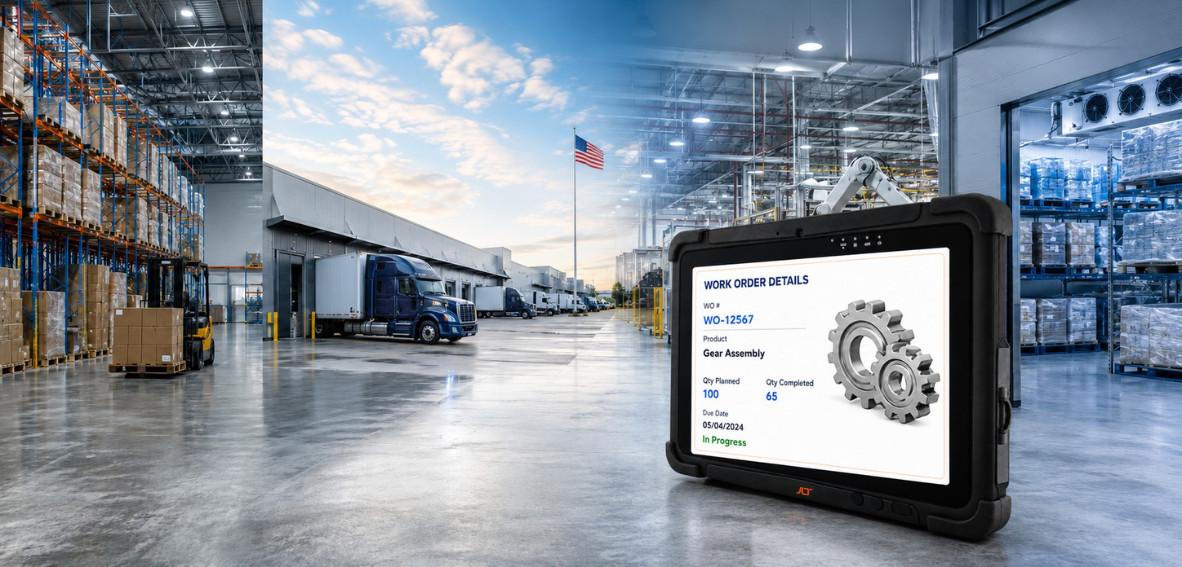
When a consumer tablet freezes on a cold storage dock, shatters on a warehouse floor, or loses touchscreen response to a gloved hand mid-pick, the cost isn’t the device—it’s the shift disruption, the WMS transaction that didn’t complete, and the operator standing idle while IT scrambles for a replacement.
Ruggedized tablets aren’t consumer devices in cases. They’re purpose-built industrial platforms engineered from the component level for the environments that destroy everything else—temperature extremes, constant drops, dust, moisture, and 10-hour shifts. This guide covers the certifications, OS decisions, and total cost of ownership picture that separate smart procurement from a recurring replacement cycle.
What Is a Ruggedized Tablet? (Quick Answer)
A purpose-built industrial device designed to operate reliably where consumer hardware fails—sealed against dust and moisture, built to survive drops and vibration, and rated across a wide temperature range from cold storage aisles to outdoor docks. The best combines sealed construction, sunlight-readable displays, glove-friendly touchscreens, industrial connectivity, and long-lifecycle OS support.
-
How Is a Ruggedized Tablet Different from a Consumer Tablet?
A consumer tablet is built for a desk; a ruggedized tablet for a -20°C freezer, a vibrating plant floor, or a sunlit dock. The difference is the sealed housing, certified drop resistance, display brightness, and temperature range that decide whether it survives its first month or its first decade.
-
What Makes a Tablet Truly Ruggedized for Industrial Use?
Independently verified standards, not marketing language — IP65/IP66 for ingress, MIL-STD-810H for drop and shock, and a -20°C to +50°C operating range. A consumer tablet in a third-party case meets none of them.
What Is a Ruggedized Tablet?
“Ruggedized” is used by genuine hardware makers and by resellers selling cases alike—knowing the difference is the foundation of a procurement decision that holds up over three to five years.
-
How Are Ruggedized Tablets Defined?
An industrial device built for physical stress, environmental exposure, and continuous duty cycles — with sealed housings, shock-absorbing construction, wide temperature ratings, and displays built for gloved, wet, or high-brightness use.
-
What Certifications and Standards Apply?
Internationally recognized standards applied under controlled test conditions — the only objective measure separating hardware that survives from hardware that claims to.
-
IP Ratings — Dust and Water Protection Explained
IP54 offers only splash resistance; IP65 adds full dust protection and low-pressure water jet resistance; IP66 extends to powerful jets—the minimum for food and beverage, cold storage, and outdoor operations.
-
Drop and Vibration Resistance — What the Standards Verify
MIL-STD-810H independently validates devices against the drops, shock, and vibration of forklift mounts, warehouse floors, and plant workstations. Drop heights and vibration ranges are tested, not estimated.
-
Operating Temperature Range for Industrial Environments
Consumer tablets manage 0–35°C; ruggedized tablets run -20°C to +50°C or beyond. For -25°C cold storage, automatic screen heaters that activate before frost forms are the difference between a device that functions and one that fails within minutes.
Not sure which ruggedized tablet fits your operation?
Where Are Ruggedized Tablets Used in the USA?
They’re deployed across the most demanding US industrial environments, each placing distinct demands on the hardware.
-
How Do Ruggedized Tablets Support Warehousing and Logistics Operations?
They give supervisors and inventory managers real-time WMS access untethered from a workstation, surviving drops, forklift vibration, and temperature swings—with WiFi 6E keeping transactions complete across dense metal racking.
-
How Are They Used on Manufacturing and Plant Floors?
They support quality inspections, digital work instructions, traceability, and real-time MES access on sealed, shock-resistant hardware with PowerTouch displays that respond to gloved hands.
-
How Do They Perform in Cold Storage and Food and Beverage?
Transitions between -25°C freezers and ambient areas cause condensation that destroys consumer hardware. Ruggedized tablets handle it with automatic screen heaters, IP66 sealing, and PowerTouch for wet and gloved hands.
-
How Do They Support Transportation and Field Operations?
They give drivers and field supervisors mobile access to dispatch, delivery confirmation, and compliance data outdoors, where WWAN and Private LTE hold connectivity beyond warehouse WiFi.
Challenges Standard Tablets Face in Industrial Environments
Consumer tablet failures in industrial settings aren’t edge cases—they’re the baseline conditions of every shift.
-
Why Do Consumer Tablets Fail in Warehousing and Logistics?
They aren’t sealed against dust, housings crack on concrete, touchscreens miss gloved inputs, batteries drain in cold, and displays wash out in sun—every failure is predictable and eliminated by a ruggedized device.
-
How Do Temperature Swings and Moisture Destroy Standard Hardware?
A 30–40°C swing within a shift forms condensation inside unsealed devices, reaching the PCB and battery connector. The damage is cumulative and irreversible; IP66 sealing and screen heaters eliminate it entirely.
-
What Is the Real Cost of Tablet Failure in an Industrial Operation?
Never just the device—it’s the stalled transaction, idle operator, IT ticket, replacement cycle, and retraining. Across 20–50 devices, consumer failure rates exceed the rugged premium within 18 months.
What Defines the Best Ruggedized Tablet for US Industrial Operations?
The separators are found in durability certifications, display technology, connectivity, and OS ecosystems—each affecting uptime, productivity, and total cost of ownership.
-
What Durability Standards Are Non-Negotiable?
Three: IP65 or IP66 ingress protection, MIL-STD-810H validation, and a temperature range covering the facility’s coldest and hottest zones. A device missing any one isn’t genuinely ruggedized.
-
How Important Is Display Performance in Industrial Settings?
A display that washes out, misses gloved inputs, or frosts in cold storage is an operational bottleneck compounding across every transaction and operator.
-
Sunlight-Readable Screens for Outdoor and High-Brightness Environments
800 NITS minimum indoors and higher outdoors. Dimmer displays force operators to reposition or shade the screen, adding friction to every outdoor transaction.
-
Glove-Friendly and Wet-Touch Capability — PowerTouch Explained
PowerTouch enables interaction with gloved, wet, or rain-soaked hands — a productivity requirement wherever gloves are standard PPE, not a convenience feature.
-
What Connectivity Does an Industrial Tablet Need?
Connectivity links the tablet to every system it accesses. A dropped connection mid-transaction breaks the data flow and creates recovery overhead costing more than the loss itself.
-
WiFi 6E, WWAN, and Private LTE for Complete Coverage
WiFi 6E at 9.6 Gbps clears dead zones across dense infrastructure; WWAN and Private LTE extend coverage to outdoor yards, port terminals, and large campuses. The best tablets support all three.
-
What OS Options Support US Industrial Workflows?
The OS is the foundation of every application — the right choice supports five to seven years of deployment; the wrong one forces a disruptive migration.
-
Windows 11 IoT LTSC for Enterprises Running WMS and ERP
Long-term support aligned with industrial lifecycles, without forced consumer updates—the right fit for Windows-based WMS and ERP. Windows 10 reached the end of support in October 2025.
-
Industrial Android x86 for Modern Touchscreen Workflows
Purpose-built for rugged computing, delivering modern touchscreen workflows, enterprise apps, and mobility management for 24/7 deployment—without the limits of consumer Android.
Ready to evaluate ruggedized tablets for your operation?
Ruggedized Tablets vs Consumer Tablets—A Direct Comparison
The decision isn’t a price decision—it’s a total cost of ownership decision across durability, performance, and three-year cost.
-
How Do They Compare in Durability and Lifespan?
A ruggedized tablet at IP66 and MIL-STD-810H is engineered for five to ten years; a consumer tablet in the same environment typically needs replacement within 12–18 months. The gap compares value over a decade versus cost over 18 months.
-
What Are the Performance Differences Under Industrial Conditions?
Consumer touchscreens miss gloved inputs, displays wash out, batteries drain in cold, WiFi drops in metal environments, and processors throttle in heat. Ruggedized tablets eliminate each gap by design.
-
How Does Total Cost of Ownership Compare Over Three Years?
The ruggedized tablet’s higher unit price is offset by avoiding replacement cycles, IT overhead, and disruption. Across 30 devices, the three-year TCO difference justifies the investment on cost alone, before uptime gains.
How Ruggedized Tablets Improve US Industrial Operations
The impact shows up in throughput, productivity, data accuracy, and real-time visibility.
-
How Do They Reduce Downtime on the Floor?
By eliminating the failures that create downtime — no IT tickets, replacement cycles, or idle operator time. The reduction is measurable within the first operational quarter.
-
How Do They Improve Operator Productivity and Accuracy?
PowerTouch removes the friction of removing PPE, sunlight-readable screens end repositioning, and reliable WiFi 6E ends retry loops—incrementally per transaction, significant at scale.
-
How Do They Enable Real-Time WMS and ERP Access?
Supervisors and operators get live data at the point of work, without returning to a workstation or working from stale information—an advantage that compounds across every shift.
How JLT Delivers High-Performance Ruggedized Tablets for US Operations
With more than 30 years of in-house engineering and production in Sweden, JLT delivers ruggedized tablets purpose-built for conditions standard hardware can’t handle, backed by a full ecosystem of software, services, and support.
-
What Makes JLT Ruggedized Tablets Different from the Competition?
Single-piece all-aluminium housings, board-to-board connectors, PCBs fixed to the housing, PowerTouch displays up to 1,200 NITS, WiFi 6E plus WWAN and Private LTE, TPM 2.0 on every model, and a 3-year warranty—the engineering baseline before any device leaves Växjö, Sweden.
-
How Does JLT Insights Add Fleet Visibility Across Every Tablet?
Real-time fleet visibility—remote diagnostics, usage analytics, maintenance alerts, impact monitoring, and battery health—turning each tablet into a source of operational intelligence that helps teams stay ahead of failures.
-
How Does JLT Care Keep Tablet Fleets Running Without Interruption?
A no-questions-asked agreement covering all failures with guaranteed repair turnaround, worldwide pick-up and drop-off, and fixed-price coverage in 3-year and 5-year terms.
Find the right ruggedized tablet for your US operation.
Frequently Asked Questions
What is the difference between a ruggedized tablet and a consumer tablet?
What IP rating do I need for a ruggedized tablet in a warehouse?
Can ruggedized tablets work in cold storage environments?
What connectivity do ruggedized tablets support for industrial operations?
Which OS is better for ruggedized tablets — Windows or Android?
How long do ruggedized tablets last in industrial environments?
Still have questions? Our experts are ready to help.