
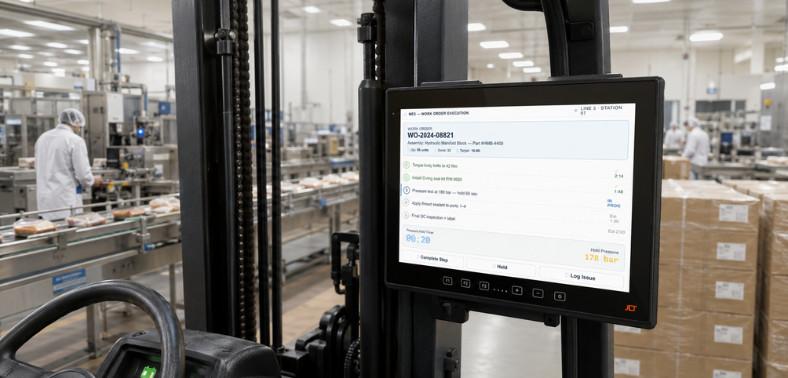
When a forklift terminal fails in a -25°C freezer, a port crane loses connectivity at peak throughput, or a factory device cracks under vibration, the cost is never just the device—it’s the downtime, stalled workflows, and missed SLAs that follow.
The best rugged computers aren’t general-purpose devices adapted for tough environments. They’re purpose-built industrial platforms engineered from the ground up for the conditions that destroy consumer hardware—temperature extremes, shock, vibration, dust, moisture, and 24/7 duty cycles. This guide covers the certifications, construction decisions, connectivity standards, and total cost of ownership picture that separate short-term procurement from long-term strategy.
What Are the Best Rugged Computers? (Quick Answer)
The best rugged computers are purpose-built vehicle-mounted terminals engineered to perform reliably in harsh environments—not adapted consumer devices, but designed from the ground up for ports, manufacturing, cold storage, and logistics. For US operations, they combine sealed aluminium construction, high-brightness displays, industrial-grade connectivity, and long-lifecycle OS support, delivering measurable uptime and lower total cost of ownership.
-
What Makes a Rugged Computer Stand Apart from the Competition?
Engineering beyond surface-level certification claims—single-piece all-aluminium housings, board-to-board connectors with no flex cables, PCBs fixed to the housing, displays up to 1,200 NITS, and 22 VMT configurations from 7-inch to 15-inch.
-
How Do the Best Rugged Computers Differ from Standard Devices?
Sealed against dust and moisture, operating from -30°C to +55°C, MIL-STD-810H validated, and backed by 3-year standard warranties—the difference between hardware that keeps operations running and hardware that creates the downtime it was bought to prevent.
What Is a Rugged Computer?
“Rugged” isn’t marketing language—it’s a measurable engineering difference that shows up in uptime, service life, and total cost of ownership.
-
How Are Rugged Computers Defined?
An industrial device built to survive shock, vibration, temperature extremes, dust, and moisture without performance degradation across a full shift—purpose-built from the component level, not a consumer device in a case.
-
What Standards and Certifications Matter Most?
The best rugged computers are validated against internationally recognized standards — the baseline separating hardware that survives from hardware that merely claims to.
-
IP65, IP66, IP67 — What the Ratings Actually Mean
IP65 protects against dust and low-pressure water jets; IP66 extends to powerful jets for washdown in food and beverage and cold storage; IP67 adds temporary immersion up to one meter. For regular washdown or outdoor exposure, IP66 or IP67 is the minimum.
-
MIL-STD-810H — What It Verifies in Real Conditions
The US military standard validates devices against shock, vibration, humidity, altitude, and temperature extremes under controlled conditions—independently verified performance, not claims.
-
Operating Temperature Range—Why -30°C to +55°C Is the Benchmark
Consumer devices manage 0–35°C; the best rugged computers run -30°C to +55°C, covering blast freezers, cold storage, outdoor yards, and factory floors in one device. Screen heaters activate before frost forms; thermal management holds performance at the upper limit.
Not sure which rugged computer fits your environment?
Why Industrial Operations Need the Best Rugged Computers
The gap between rugged and consumer hardware becomes visible the first time a device fails mid-shift—with consequences far beyond the device cost.
-
What Happens When the Wrong Hardware Fails in the Field?
A line terminal failure stops material flow; a cold storage failure stalls picking across the shift; a downed terminal halts crane operations and delays vessel departures. The cost is measured in lost throughput.
-
How Does Downtime Cost More Than the Device Itself?
Every minute of unplanned downtime carries stalled workflows, idle operators, and missed SLAs. Cheaper consumer hardware consistently costs more over three years once maintenance, replacements, and lost productivity are counted.
-
Why Consumer-Grade Devices Cannot Survive Industrial Environments
They aren’t sealed; housings crack under vibration, displays fog in temperature transitions, and batteries fade in deep cold. Deploying them industrially is a compounding cost that grows with every replacement cycle.
Where Are the Best Rugged Computers Used?
They’re deployed across the most demanding industrial environments worldwide, each with unique hardware demands.
-
How Do Rugged Computers Perform in Ports and Container Terminals?
Terminals demand resistance to salt air, crane vibration, direct sunlight, and 24/7 operation. OPCSA, the largest container terminal in the Canary Islands, standardized on JLT rugged computers to future-proof its operations and maintain throughput across all handling equipment.
-
What Role Do They Play in Manufacturing and Factory Floors?
They connect operators to MES systems, support lineside replenishment, and enable digital quality inspections. SSAB, a global steel manufacturer, has run JLT rugged computers since 2003 with an almost non-existent failure rate. Volvo deployed JLT devices across its forklift fleet to improve connectivity and operational data collection.
-
How Do They Support Cold Storage and Temperature-Controlled Operations?
The most demanding environment for any device—the best cold storage computers operate at -30°C with automatic screen heaters and PowerTouch displays that respond to gloved hands in wet freezer conditions.
-
How Are They Used in Mining, Logistics, and Yard Management?
In mining, haul-truck and drilling-equipment terminals provide real-time ore data and predictive maintenance alerts. In logistics, Solar Denmark deployed JLT VMTs with SAP EWM, improving throughput and on-time delivery across five countries and more than 3,000 employees.
Key Features That Define the Best Rugged Computers
The separators are found in construction, display, connectivity, and OS ecosystems—each affecting uptime, productivity, and total cost of ownership.
-
What Construction Standards Separate Good from Best?
The housing is where ruggedness begins—a device that looks tough but uses standard internal construction fails under vibration, moisture, and thermal stress.
-
Single-Piece All-Aluminium Housing — Why It Matters
Milled for superior sealing and heat dissipation, eliminating the panel gaps and flex cable entry points where moisture, dust, and vibration damage begin.
-
Board-to-Board Connectors and No Flex Cables
No internal cables to work loose under constant vibration—a critical advantage in forklift, crane, and heavy equipment environments.
-
PCB Fixed to Housing — Vibration and Shock Resistance
Eliminates component movement under shock and vibration—the single decision behind the decade-long service life that lesser hardware can’t match.
-
What Display Capabilities Are Required?
Display performance directly affects operator speed, accuracy, and safety—a screen that fails in sunlight, misses gloved inputs, or frosts over is a productivity and safety issue.
-
Brightness—Why Up to 1,200 NITS Is the Industrial Standard
Outdoor yards, crane cabs, and sunlit docks need sunlight-readable displays. The best delivers up to 1,200 NITS — three times the competing devices that top out at 400 NITS.
-
PowerTouch — Glove and Wet-Hand Operation
Responds to gloved, wet, and rain-soaked hands without missed inputs—a fundamental requirement wherever gloves are standard and hands are wet.
-
Screen Heater Options for Cold Storage Environments
Automatic screen heaters activate before frost forms, protecting throughput where a fogged display stops every transaction until it clears.
-
What Connectivity Does the Best Rugged Computer Need?
Connectivity links the computer to every system it serves—WMS, MES, ERP, and TOS. A dropped connection breaks the data flow that the whole operation depends on.
-
WiFi 6E (9.6 Gbps) — The New Industrial Standard
Eliminates dead zones across dense metal infrastructure and hundreds of connected devices—keeping high-throughput operations moving where latency affects speed.
-
WWAN and Private LTE — Connectivity Beyond Four Walls
Keep devices connected across outdoor yards, port terminals, and mining sites beyond standard WiFi reach, so data flows continuously wherever the device is deployed.
-
What OS and Security Should the Best Rugged Computer Run?
The wrong OS creates a migration crisis; the right one creates a stable, supported platform for five to seven years.
-
Windows 11 IoT LTSC — Why Long-Term Support Matters
Long-term support aligned with industrial lifecycles, without forced consumer updates. Windows 10 reached end of support in October 2025 — unsupported fleets carry direct security and compliance exposure.
-
Industrial Android x86 — When It Is the Right Choice
Purpose-built for rugged computing, delivering the modern touchscreen workflows current WMS and ERP integrations require, without the limits of consumer Android.
-
TPM 2.0 — Why Security Cannot Be Optional
A hardware security standard protecting operational data and system integrity — a non-negotiable baseline for any connected industrial operation, not an optional upgrade.
Want to see the full JLT rugged computer range?
Best Rugged Computers: How Does the JLT Range Compare?
With more than 30 years of in-house engineering and production in Sweden, JLT delivers 22 VMT configurations purpose-built for environments standard rugged hardware can’t handle.
-
How Do Entry-Level and High-Performance Rugged Computers Differ?
The range spans entry-level rugged for logistics and cold storage through heavy-duty computing for ports, mining, and automation — matching the device to the deployment rather than forcing one model everywhere.
-
JLT6012 and JLT1214N — Logistics and Cold Storage
The JLT6012 is a 12-inch entry-level VMT on Intel Atom x6413E with up to 480GB SSD, WiFi 6E, and Windows 11 IoT LTSC. The JLT1214N is the cold storage specialist — rated to -30°C with automatic screen heater, PowerTouch display, and the same connectivity and OS platform.
-
VERSO Series — Ports, Mining, and Heavy Industry
Running on Intel Core i3 and i7 1185GRE processors for port TOS, mining fleet management, and heavy automation. It is the only VMT range in the world validated as Navis Ready for Kaleris N4 TOS integration — a certification no competing manufacturer holds.
-
How Do 22 VMT Configurations Give Operations the Right Fit?
22 configurations spanning 7-inch to 15-inch displays across processor, memory, storage, and connectivity options let operations match device to environment. Custom builds and private-label solutions are available beyond standard configurations.
-
How Does JLT Compare to the Competition?
Competing VMTs offer one product with two options, 400 NITS displays, 32GB flash, WiFi-only on an end-of-life processor, and a one-year warranty. JLT delivers 22 configurations, up to 1,200 NITS, up to 512GB SSD, WiFi 6E plus WWAN and Private LTE, TPM 2.0 standard, and a 3-year warranty — backed by in-house R&D and production in Sweden.
Total Cost of Ownership — Why the Best Is Not the Most Expensive
The best rugged computers cost more per unit and significantly less per productive hour over a five- to seven-year horizon.
-
How Does Hardware Built for the Environment Reduce Long-Term Costs?
Hardware engineered for the environment fails less—there are fewer replacements, service interventions, and disruptions. The upfront cost is recovered within the first replacement cycle of consumer alternatives.
-
What Does a 3-Year Standard Warranty Mean for Operations?
Three times the one-year cover of competing hardware: predictable maintenance budgets, faster resolution, and a supplier standing behind reliability. Across fleets of 50+ devices, the warranty difference alone is a significant advantage.
-
How Do Longer Device Lifecycles Reduce Refresh Cycles?
Some JLT customers still run the same devices more than a decade after purchase—fewer procurement cycles, integration projects, and retraining costs, compressing the total cost of ownership across the planning horizon.
How JLT Delivers the Best Rugged Computers for Industrial Operations
JLT is not a reseller — every product is developed, tested, and manufactured in-house in Sweden, giving full control over quality, component availability, and lifecycle support.
-
How 30+ Years of Engineering Backs Every JLT Product
More than 30 years across forestry, agriculture, ports, mining, manufacturing, and cold storage is built into every construction decision, component choice, and testing standard before a device leaves Växjö, Sweden.
-
How JLT Insights Extends the Value of Every Device
Real-time fleet visibility — remote diagnostics, usage analytics, maintenance alerts, and impact monitoring from one dashboard—turns each device into a source of operational intelligence that surfaces issues before they become failures.
-
How JLT Care Keeps Operations Running Without Interruption
A no-questions-asked agreement covering all failures with guaranteed repair turnaround, worldwide pick-up and drop-off, and fixed-price coverage in 3-year and 5-year terms.
-
How Customization Solves What Off-the-Shelf Cannot
More than 100 customizations over 30 years—custom antennas, CAN-bus integration, ATEX adaptations, private labeling, specialized connectors, and fully custom hardware for any vehicle type or environment.
Ready to find the right rugged computer for your operation?
Frequently Asked Questions (FAQs)
What is the best rugged computer for cold storage?
The JLT1214N is purpose-built for cold storage—operating at -30°C to +55°C with an automatic screen heater that activates before frost forms and a PowerTouch display for gloved hands in wet freezer conditions.
How long do rugged computers last in industrial environments?
What connectivity do the best rugged computers support?
Is Windows 11 IoT LTSC available on rugged computers?
What is the difference between IP65, IP66, and IP67 for rugged computers?
How do I choose the right rugged computer for my operation?
Still have questions? Our experts are ready to help.